What's included in the download
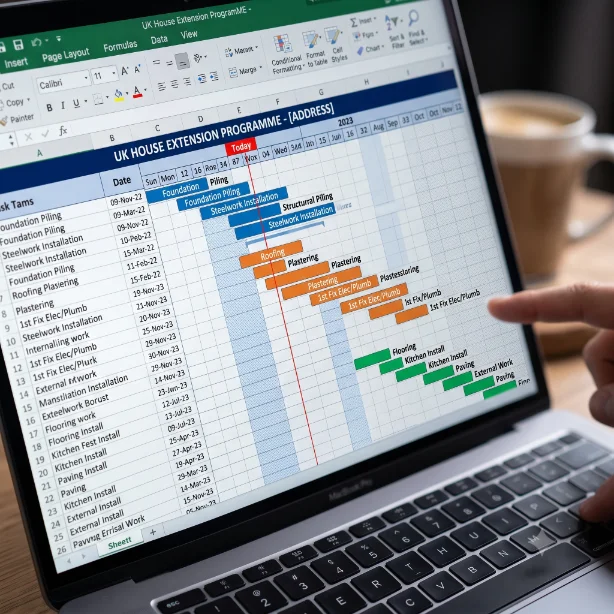
The Excel file contains four worksheets - an instructions tab and three project-specific Gantt charts. Each sheet shows tasks laid out against a weekly timeline with colour-coded bars for tasks and milestones.
House Extension
From Building Control application through groundworks, superstructure, weathertight, first and second fix to practical completion.
Loft Conversion
Scaffold, structural work, weathertight, first fix, plastering, second fix and completion - including dormer variants.
New Build Groundworks
Setting out, bulk excavation, drainage, foundations, oversite and slab up to handover for superstructure.
What each Gantt chart includes
- Task reference number, name, responsible trade and notes
- Start Week and Duration (weeks) columns - edit these to move bars
- Blue bars showing task duration across the weekly timeline
- Orange milestone markers for key programme events (weathertight, practical completion)
- Section headers grouping tasks by phase (pre-construction, structure, first fix, finishing)
- Building Control inspection points highlighted at the correct programme stage
- Frozen panes so task names stay visible while scrolling the timeline
How to use the template
Select the sheet that best matches your project type. The bars are pre-built for a typical project - adjust the Start Week and Duration values in columns D and E to suit your actual programme. Add or delete rows as needed for project-specific tasks.
The bars are pre-calculated using the start and duration values, so any change you make to the data columns will immediately update the visual chart.
Typical construction programme durations
The durations in the template are based on typical single-trade working. Bear in mind that actual durations will vary based on:
- Size and complexity of the project
- Number of operatives allocated to each task
- Ground conditions (for groundworks tasks)
- Lead times for materials such as structural steel or bespoke windows
- Building Control inspection availability in your local authority area
- Weather (especially for external works and concrete pours)